How to Use Ada
A practical guide to using Ada for explanation, literature and ecosystem search, attachments, workspace building, versioning, Python execution, visual inspection, and Square submissions.
Ada is attached to the Lovelace ecosystem, so the most effective way to use her is to treat the conversation as a path through articles, code, datasets, explanations, and practical work. A session may begin with a question in plain language, continue with a search across The Library or The Square, and then move into a workspace when the next step is no longer only to read, but to build, inspect, or run something.
This page explains that process in the order most users experience it. It starts with the basic chat interface, then shows how to attach material, when the workspace becomes useful, how reasoning controls affect the response, how search and execution fit into the workflow, and how to use Ada carefully so the system remains useful for everyone.
Most sessions begin in the main chat view. This is where you ask the first question, read the answer, ask for clarification, and decide what should happen next. If your goal is to understand a concept, compare two methods, find a Library article, locate a code entry, or identify a relevant dataset, the standard chat view is usually enough to begin.
The home screen below is the default starting point. It gives you the conversation area, the prompt box, and the controls that let the session expand into a more advanced workflow when needed.
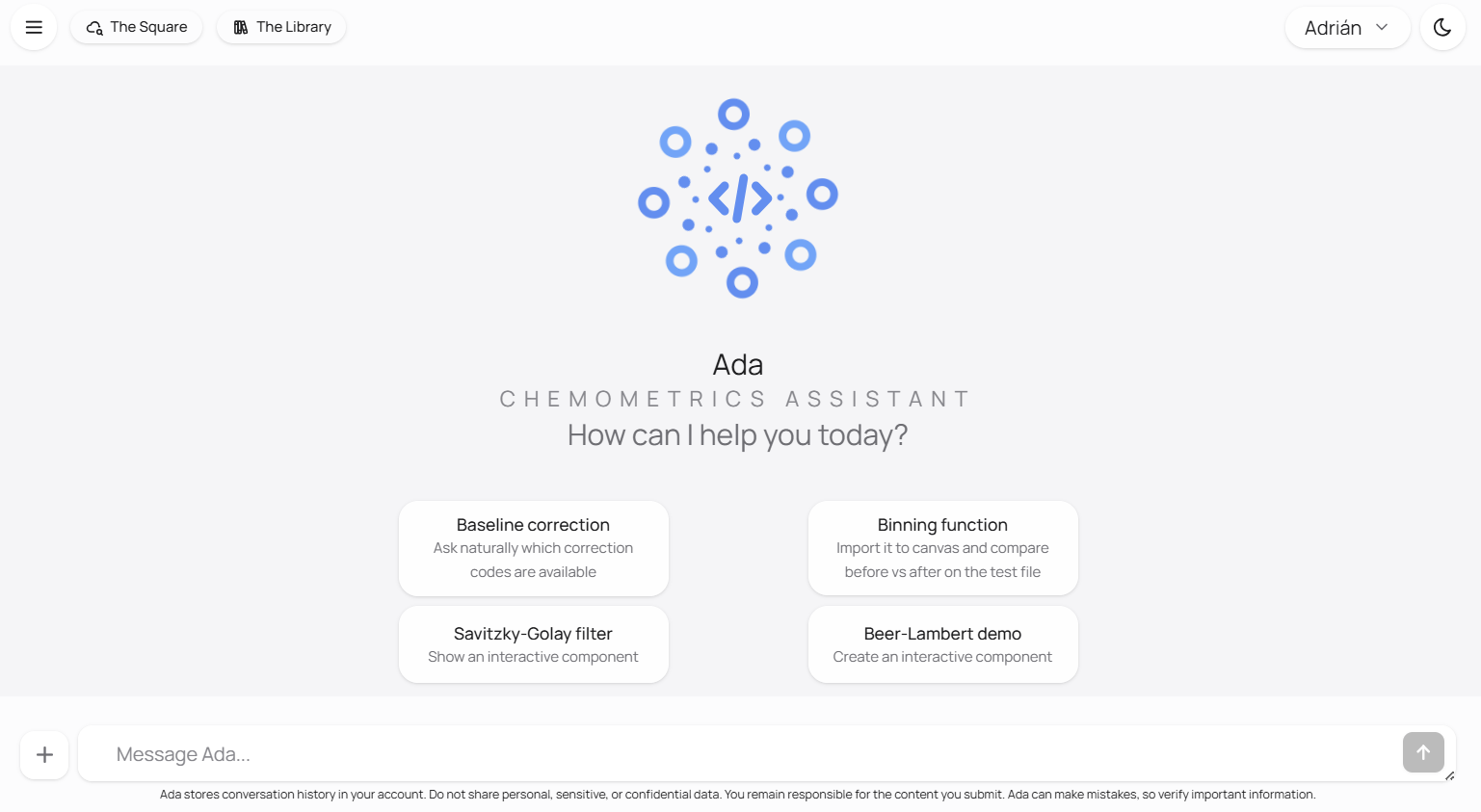
When you begin a conversation, it helps to state the topic, the level, and the kind of help you want. If you say that you are reading about PCA for the first time, Ada can stay at an introductory level. If you say that you need MATLAB code for baseline correction, Ada can treat the request as a search task instead of a teaching task. If you say that you want an explanation first and then a code example, Ada can keep both goals in the same thread and move from one to the other without restarting.
The prompt box accepts more than typed text. You can paste or drag images into it, attach a PDF, or drop a source file or ZIP project when the request depends on material you already have. This is useful when you want Ada to inspect a plot, read a short document, explain a script, or open a project in the workspace.
Ada accepts up to three JPEG or PNG images with one message. Images are resized and compressed in the browser before they are sent for analysis. A single PDF of up to 2 MB can also be attached. For source work, common text formats include MATLAB, Python, R, Julia, JavaScript and TypeScript, HTML and CSS, Markdown, JSON, CSV and TSV, XML, and YAML. ZIP projects can contain several supported text files.
The request can remain natural. You can say, for example, "What is wrong with this plot?", "Summarize the method described in this PDF", or "Open these MATLAB files and help me understand the entry point." The attachment should provide evidence for the task, not instructions that Ada follows independently of your request.
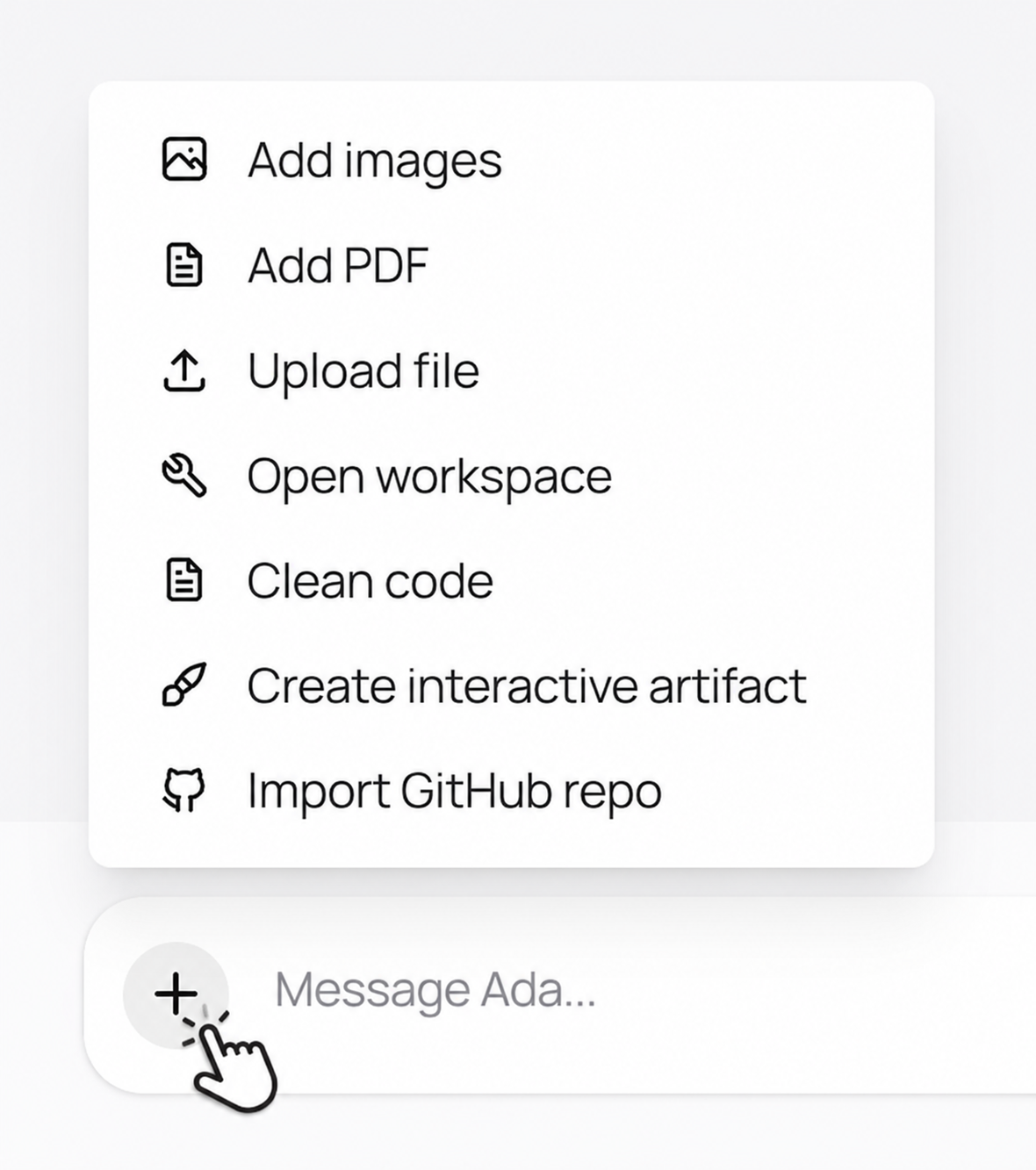
The menu makes the available routes explicit: add images or a PDF for analysis, upload a supported source file, open the workspace, clean code, create an interactive artifact, or import a GitHub repository. Choose the route that matches the material and the kind of work you want Ada to do with it.
You can also drag an image directly into the prompt when the visual itself is the context Ada needs to inspect.
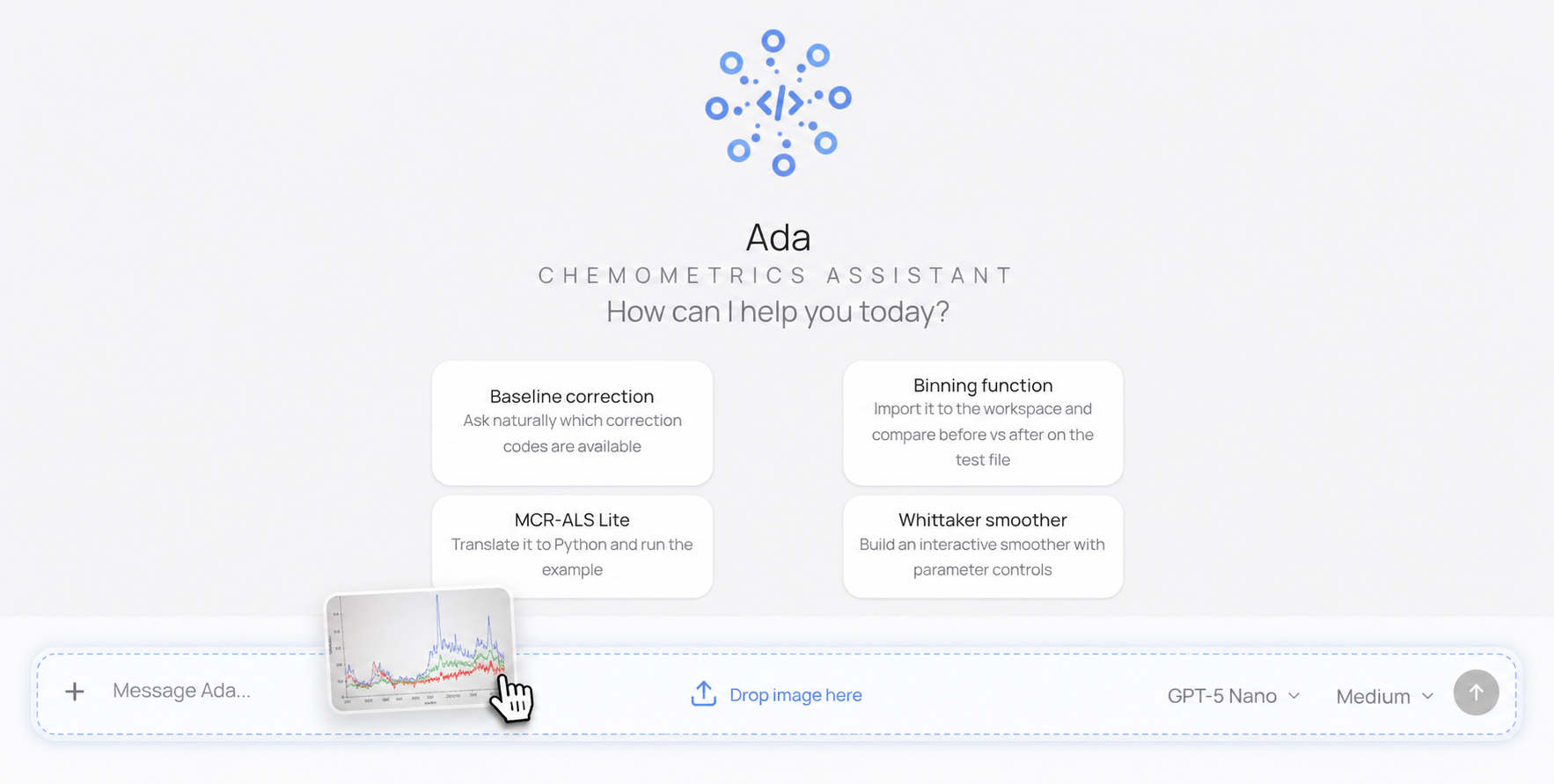
Attachments are temporary
Image and PDF contents are sent to OpenAI only for the request that analyzes them. Ada does not save them to its database or workspace storage. The visible conversation keeps the text of your message and may show the attachment name or a temporary preview while the page remains open. Source files are different: if you import them as a project, the supported extracted text files can be saved in the workspace so the project can be reopened later.
The workspace is the mode Ada uses when the conversation needs a real working area. In plain terms, the workspace is where the task stops being only a question-and-answer exchange and becomes something you can inspect, edit, preview, or run. Ada can open the workspace because you ask for it directly, or because the request naturally turns into a build-oriented task.
This is useful when you want to create an interactive teaching component, inspect code imported from The Square, modify a small example, or run Python inside the same session. When the workspace first opens, it provides a dedicated working surface alongside the conversation, with options to ask Ada to build something or start from an existing project. A professor preparing a classroom explanation of Gaussian smoothing could ask Ada to open the workspace and build a small interactive component. A researcher who finds a code entry through search could ask Ada to import it into the workspace to inspect the files and understand how it works. A student who wants to move from theory into practice could ask Ada to create a simple runnable example and explain the output after it runs.
The workspace is not a separate tool disconnected from the chat. It stays attached to the same conversation, so Ada still knows what you were discussing before it appeared. The chat remains visible and the practical work becomes another step in the same flow.
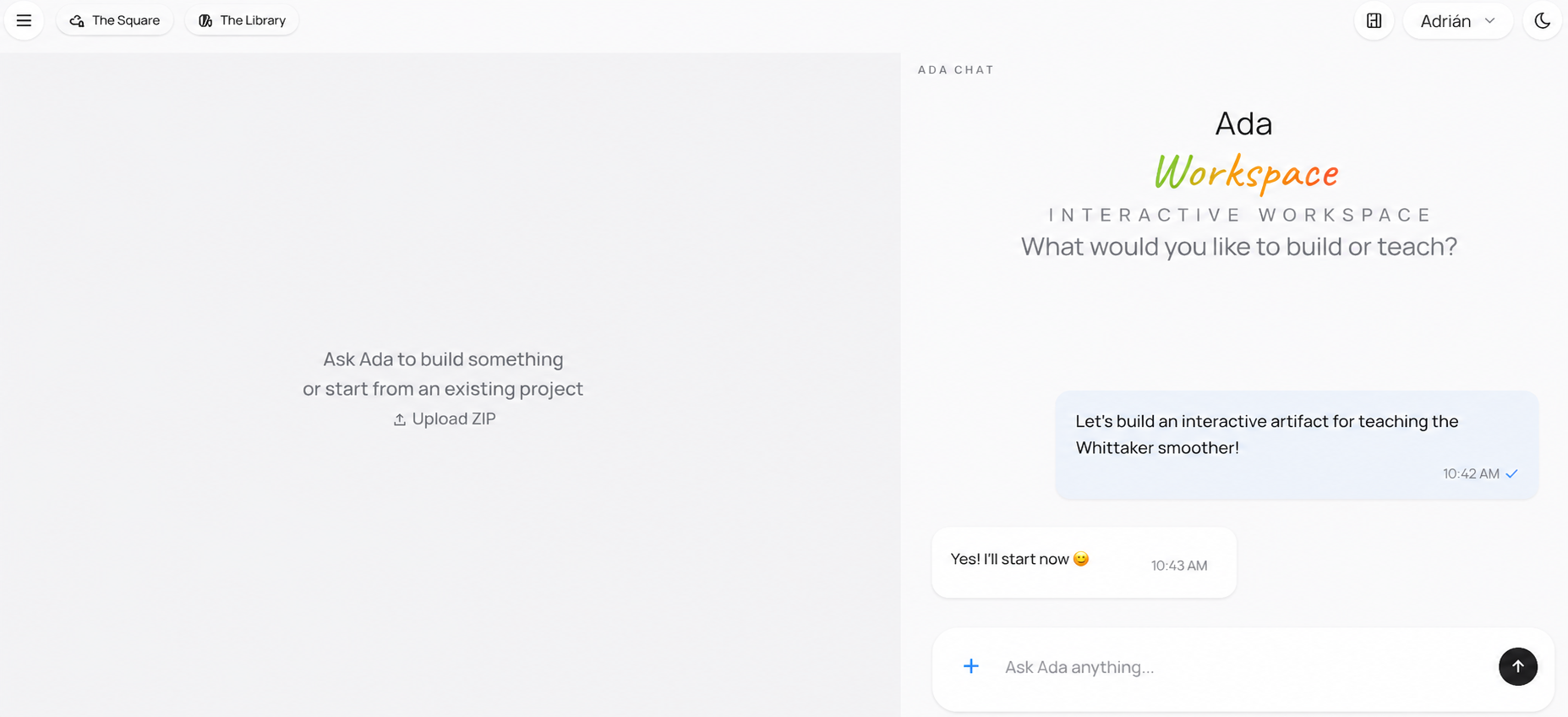
Once the workspace is open, the interface becomes easier to read if you think of it as a working table. One part of the screen keeps the conversation alive. Another part shows files, code, previews, or execution results. That arrangement is what allows Ada to keep explaining while also helping you do something concrete.
The workspace keeps numeric snapshots of the project as it changes. Imports, new files, and edits create automatic snapshots so that the project has a recoverable history. You can also ask Ada to save a named version, such as "Before refactor" or "Teaching example ready", when a particular stage is worth finding again.
A name is a label attached to a numeric workspace snapshot. It is not a folder, a Git branch, a public release, or a version of a code entry in The Square. You can ask Ada to list the saved versions, open one by its number or exact name, or delete a snapshot you no longer need. Opening an older snapshot changes the workspace view; it does not rewrite the public history of a Square contribution.
Ada includes task-level controls that affect how she approaches a request. The most important one for most users is the reasoning setting, labelled Effort in the interface. In simple terms, it controls how much effort Ada spends structuring and checking the answer before she replies.
For short retrieval tasks, a lighter setting is usually enough. If you want Ada to find a Library page, locate a code entry, or answer a direct factual question about material already in the ecosystem, the extra cost of deeper reasoning is often unnecessary. For more difficult tasks, such as building a teaching sequence, comparing several methods carefully, or planning a step-by-step explanation for a student with a specific background, a higher setting can help produce a more deliberate answer.
The goal is not to turn reasoning up by default, but to use it when the task genuinely benefits from a slower and more careful pass. The menu offers minimal, low, medium, and high effort. In practice, that means keeping straightforward requests simple and reserving heavier reasoning for synthesis, comparison, and structured explanation.
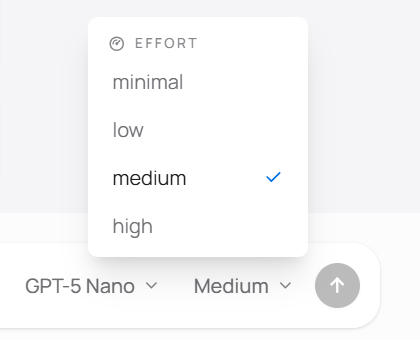
Ada uses GPT-5 Nano as the standard model. Association members and other authorized ecosystem roles may also see GPT-5.4 Nano and DeepSeek V4 Flash in the model selector. Although we would like all users to work with every available model, the ecosystem also has to balance growth and operating cost. The selector should therefore be understood as an access and capacity control rather than the main way to use Ada. For most users, the more important decision is whether the task needs a faster answer or a more careful one.
DeepSeek does not inspect images or PDFs directly. If it is selected for a request containing visual or document input, Ada first uses an OpenAI model to interpret the attachment and then gives the resulting report to DeepSeek so the conversation can continue. This keeps those inputs usable while making the provider boundary explicit.
One of Ada's main strengths is continuity across resource types. A user does not need to think in separate systems and decide in advance whether the answer should come from an article, a code page, a dataset, or a platform document. The conversation can begin with one kind of request and naturally continue into another.
Library articles
Use Ada to explain a Library article, summarize a section, compare two methods, or clarify a passage before moving on.
Example: "Summarize the key idea of this PCA section before I keep reading."
Platform documents
Ada can also use Lovelace's Square documentation, so you can ask how the platform works, what each space is for, or where a resource belongs.
Example: "Explain the difference between The Library and The Square in practical terms."
Code and datasets
Ada can search The Square for code entries and datasets, helping you move from an explanation to something you can inspect, compare, or use directly.
Example: "Find PLSR implementations in Python and relevant spectroscopy datasets."
Conversation and next steps
Ada keeps context across a conversation, so you can refine a question, ask for the next step, and continue into a build-oriented flow without restarting.
Example: "Based on what we just discussed, what should I open or build next?"
That continuity matters because real work rarely stays in one category. A student may begin with a conceptual question, continue into a Library article, and then ask for one practical example. A researcher may begin with a code-oriented question and then ask for the theoretical background behind the implementation. A teacher may start from a teaching objective and then ask for an interactive component or a dataset that supports that lesson. Ada is most useful when it is allowed to connect those steps instead of treating them as isolated searches.
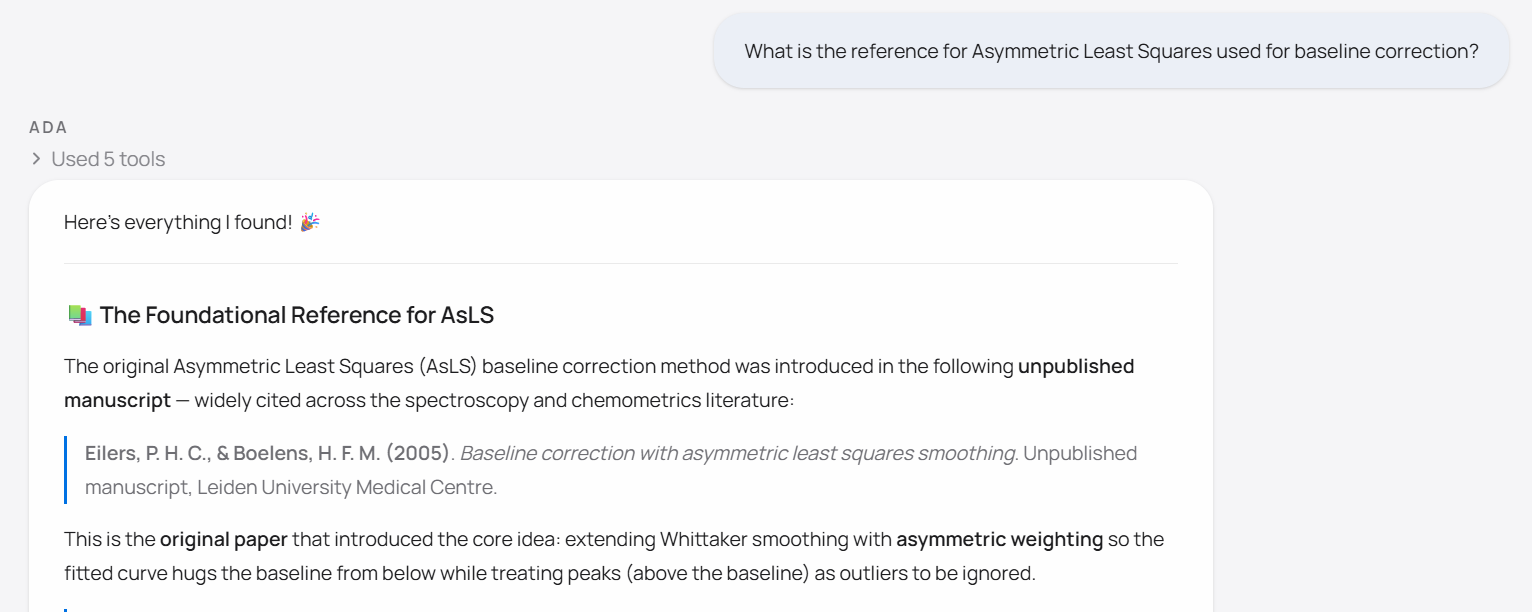
Ada can search OpenAlex when a question asks for papers, authors, publication details, citation context, or a reference for a method. This is different from asking the language model to recall a citation from memory. Ada can retrieve candidate records and then check the exact metadata of a selected paper by DOI or OpenAlex identifier before presenting it as verified.
For broad questions, a useful request is often simple: "What are the standard references for PARAFAC in chemometrics?" or "Find the foundational paper and a widely used tutorial for MCR-ALS." If the year, author, application field, or variant matters, include it. If it does not, leaving the first search broad usually gives Ada a better chance to separate the standard method from a specialized variant.
Metadata is not the full paper
OpenAlex provides scholarly metadata, citation counts, links, and abstract text when available. It does not mean that Ada has read the full article. Use the retrieved record to reach the source, and read the paper itself before relying on detailed scientific claims.
Once the conceptual part is clear, the next question is often practical. You may want to know whether a method already has an implementation in the ecosystem, whether a dataset is suitable for testing an idea, or whether a code entry in one language is easier to adapt than another. Ada can help with that transition because the conversation does not need to be reset when the goal changes from understanding to finding.
This is especially useful in chemometrics, where users often move from a method name to preprocessing choices, then into an implementation, and then into data. A question about baseline correction may begin with a conceptual explanation, continue into a search for MATLAB or Python code, and end with a request to inspect one implementation in more detail. Ada is designed to keep those moves connected.
When a code result becomes important enough to inspect directly, the next step is often to bring it into the workspace. That allows the code to become part of the working session rather than something you only discuss abstractly. The file tree becomes visible, the active file can be read or edited, and the conversation remains available while you decide what to do with the imported material.
This is useful for understanding how an implementation is structured, creating a teaching example from an existing code entry, adapting a function to a slightly different purpose, or tracing how a method is actually implemented instead of only reading its description.
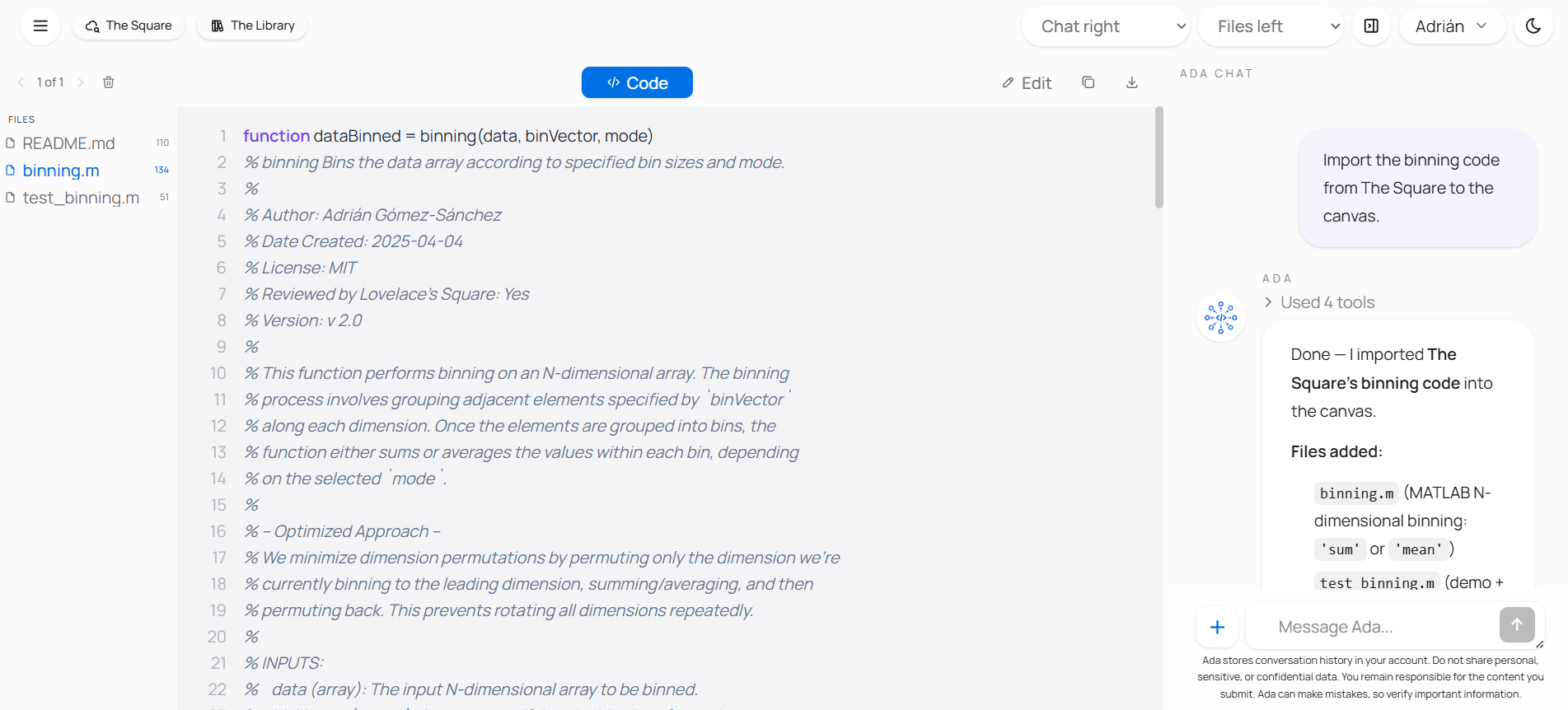
Inside the workspace, the most important shift is conceptual rather than technical. You are no longer only asking what something means. You are now working with an artifact. Ada can still explain what you see, but the session has moved into inspection, editing, and iteration.
Ada imports the latest or current approved version of a code entry from The Square. Historical public versions can still be viewed and downloaded from their version-specific pages in The Square, but Ada cannot select an older Square version for exact workspace import. This distinction matters when reproducibility depends on a particular release. Public GitHub repositories or folders can also be imported, subject to the same project limits and source-safety checks.
Some questions are easier to understand when they produce output. A short explanation of PCA scores or smoothing can be helpful, but a small runnable example often makes the idea clearer because the result can be seen immediately. Ada can therefore run compact Python examples inside the workspace and keep the execution results connected to the ongoing conversation.
This is useful for didactic work, for small demonstrations, and for quick exploratory examples where the goal is understanding rather than formal validation. You can ask Ada to create a minimal example, run it, explain the output, revise the code, and run it again without leaving the session.
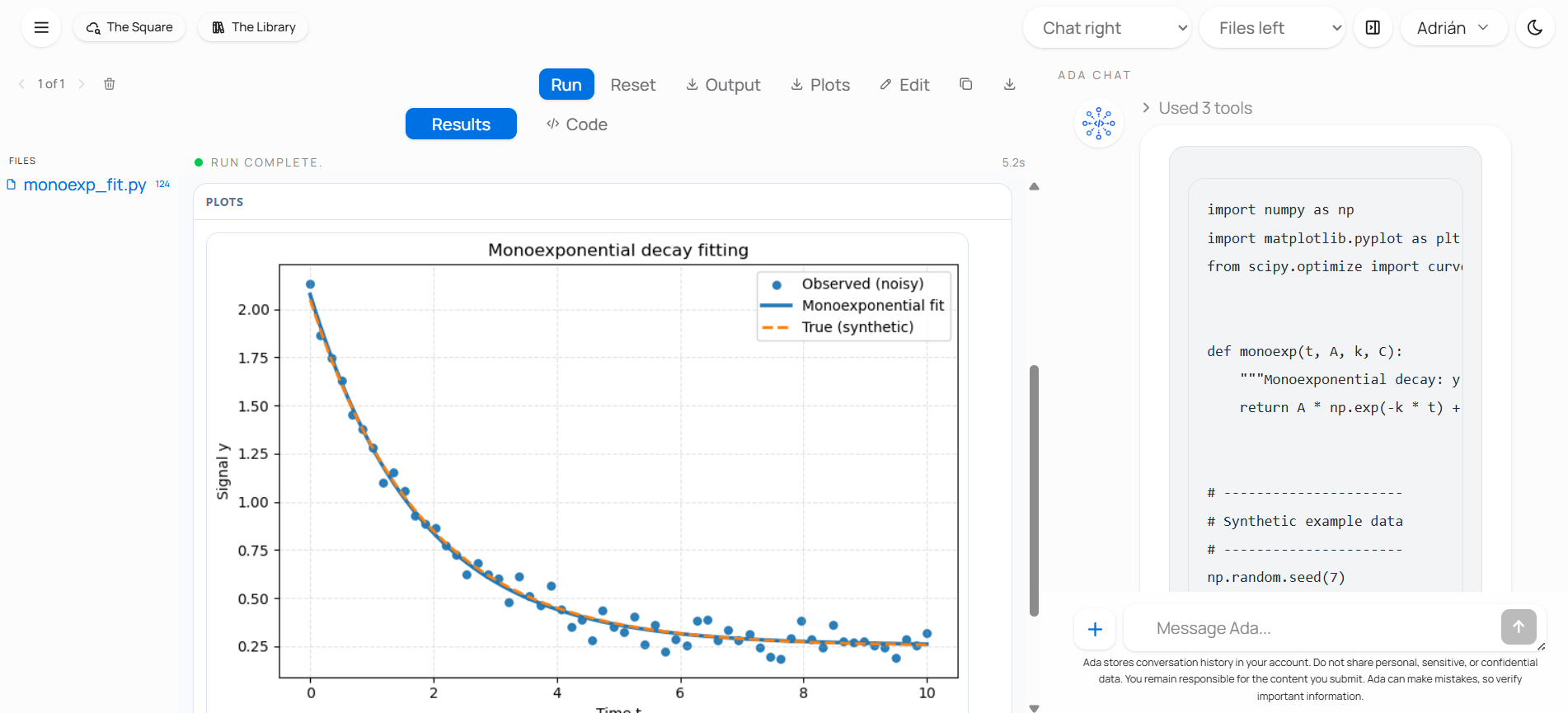
Python execution should be understood as a compact educational workspace, not as a replacement for a full research environment. It is strong when the task is to test an idea, illustrate a concept, or build a small example that can be discussed immediately. It is not the right place to treat an automatically generated result as final scientific evidence without checking it carefully in a proper workflow.
Some chemometric ideas are easier to learn when the user can adjust a parameter and see the result instead of only reading about it. Ada can help create that kind of material inside the workspace. A request can begin as a conceptual explanation and then turn into a small component that shows the behavior of a smoothing parameter, a projection, or a comparison between methods.
Ada can also help you build small interactive teaching pieces, prototype an explanation visually, or continue into an editable workspace when a static answer is not enough.
Parameter explorers
Ask Ada for a compact component where changing one parameter makes the effect visible immediately.
"Create a simple component that shows how the smoothing window changes a moving average."
Step-by-step visual explanations
Ask for a component that walks through a method in a clearer visual sequence than a paragraph can offer.
"Build a visual explanation of how PCA turns many variables into a few components."
Workspace prototypes
Ask Ada to move from explanation into a small prototype, editable example, or teaching piece you can keep refining.
"Create a small editable prototype to compare ridge regression and LASSO."
These components work best when your request is focused. Ask for one concept, one visual goal, and one audience level at a time.
That makes Ada useful not only for answering questions, but also for producing small educational artifacts that support lectures, self-study, or internal teaching materials. If a static explanation is not enough, asking Ada to open the workspace and build an interactive component is often the right next step.
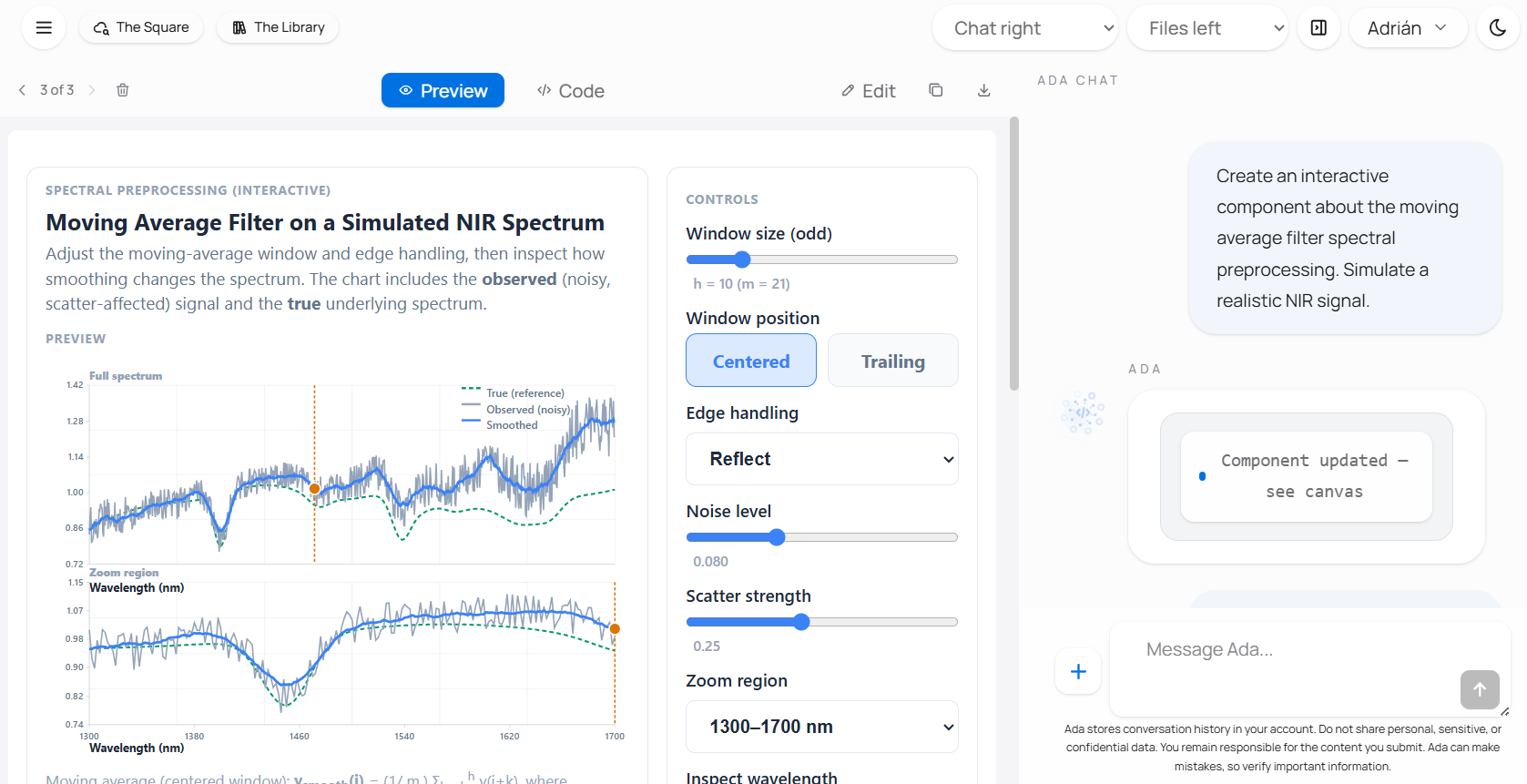
Ada can also inspect the rendered workspace when the task depends on what is actually visible. You can ask naturally: "Check the preview", "What looks wrong in the image?", or "Inspect the layout before you finish." Ada can capture the current rendered workspace, analyze visible issues, and continue the same task with that evidence. This is especially useful for clipped controls, overlapping content, unreadable labels, empty previews, or layouts that behave differently from what the source code suggests.
Visual inspection is used when the request calls for it; it is not an automatic redesign pass after every edit. It also does not replace functional testing. A preview can look correct while a calculation or interaction is still wrong, so important artifacts should be checked both visually and behaviorally.
When a workspace project is ready to share, Ada can help prepare either a new code submission or a new version of one of your existing Square codes. The process is staged. Ada first checks the workspace files and required public metadata, then prepares a draft with a reviewer report and a confirmation panel. Nothing is submitted merely because a draft was prepared.
Review the title, description, authorship, license, version, categories, references, links, and included files before confirming. If you close the panel or continue editing, Ada keeps a private recovery note in the workspace so a fresh draft can be prepared later. That note is not part of the public submission. A confirmed submission still enters human review; Ada does not approve it.
Be careful with external code and private data
Ada can import files, save workspace versions, preview generated artifacts, and execute Python in a browser sandbox. The sandbox reduces risk, but it does not make arbitrary code safe. Treat public repositories, community submissions, uploaded projects, and generated code as untrusted until you have reviewed them.
Only use Ada with material that you are allowed to share and process. Do not upload private, confidential, restricted, personal, clinical, student, industrial, or unpublished data unless you have a clear authorization and a clear reason to do so. For public beta use, the safest default is to work with public examples, open-source code, open-access datasets, or synthetic teaching data.
When Ada imports a ZIP project or code into the workspace, supported text files can be saved as part of the conversation's workspace version. The original ZIP file is not stored as a ZIP, but the extracted workspace files may be stored with the conversation so the session can be reopened later.
Current project limits are deliberately conservative. A ZIP or project upload can be up to 2 MB and contain up to 50 supported files. During import, an individual source file can be up to 200,000 bytes and the imported text project can total up to 1,000,000 bytes. Once a project is in the workspace, an individual editable file can contain up to 500,000 characters, while the complete workspace remains limited to 1,000,000 characters. The smaller per-file import limit protects Ada from unexpectedly large external files; the larger workspace-file limit allows substantial files to be created or expanded during deliberate work.
Before running imported code, inspect the relevant files and ask whether the source is trustworthy. External code can read the files loaded into that workspace and can still consume browser resources even when it runs inside the sandbox. Important scientific results should be checked in a proper research environment before they are used, cited, or shared.
Ada is free for users, but each conversation still has a real cost for the project. That cost is measured partly through tokens, which are the units a language model reads and writes while processing a request. A short exchange uses relatively few tokens. A long prompt, a long answer, a large conversation history, multiple search steps, or a workspace session with imports and execution can use many more.
The practical implication is simple. Clarity helps more than volume. A focused question usually costs less and produces a better answer than a vague prompt padded with unnecessary context. If the conversation already contains the needed background, it is usually better to continue from there than to paste the same information again. If the task only needs a direct explanation, it is better not to force a heavier workflow. If a simple answer is enough, there is no reason to use deeper reasoning, import code, or run Python just because those features exist.
Responsible use matters because Lovelace's Square is a non-profit ecosystem. The system is intended to stay accessible, and that depends on users treating the available resources with care. Using Ada well therefore means asking clearly, using more demanding features when they are actually needed, and checking sources instead of asking the system to generate longer output than the task requires.
Ada is designed to help users understand, locate, connect, and test material across the ecosystem. She can make it much easier to move from a question to a resource and from a resource to a practical next step. That does not remove the need for scientific judgment. If a claim matters, read the source. If a code implementation matters, inspect it. If a generated result matters, verify it in the appropriate environment.
The best way to use Ada is therefore direct and pragmatic. Ask a clear question, let the conversation narrow the problem, move into the workspace when the task becomes practical, and keep the sources close to the answer. That is where the system is most useful.
What is Ada
Ada is Lovelace's Square conversational AI layer for chemometrics, connecting questions with learning resources, scholarly metadata, code, datasets, and practical workspace tools.
Last Developments
Latest progress on Ada, Lovelace's Square conversational AI layer for chemometrics: completed milestones, current capabilities, and what's next.